
A practical guide for U.S. WooCommerce owners facing mass product-page indexation issues: the documented Search Console evidence, what I prioritized, and how to investigate a similar pattern without promising Google will index every URL.
Table of Contents(10 sections)
The short answer for WooCommerce store owners
I’m Mubashar Sharif, founder of SearchPrex. This field guide is for U.S. ecommerce operators working through a large “Discovered – currently not indexed” or “Crawled – currently not indexed” report. It draws on the Michigan Sports & Outdoor case evidence and the workflow I use to organize an investigation. It does not promise that another store will get the same result.
What the Search Console evidence shows
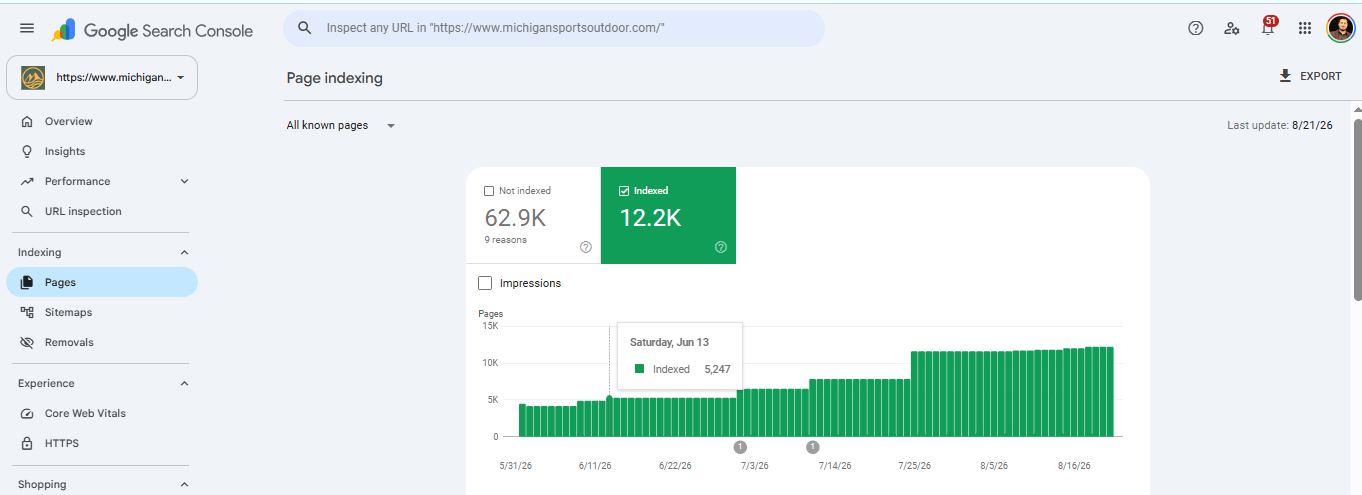
The SearchPrex case study records approximately 4,000 indexed pages at the end of May 2026 and 12,200 (12.2K) indexed URLs on August 21, 2026. That is a rise over roughly three months—not one month. It is a before-and-after observation during broader SEO work, so it does not isolate one change as the sole cause. Google’s indexing remains a decision made URL by URL.
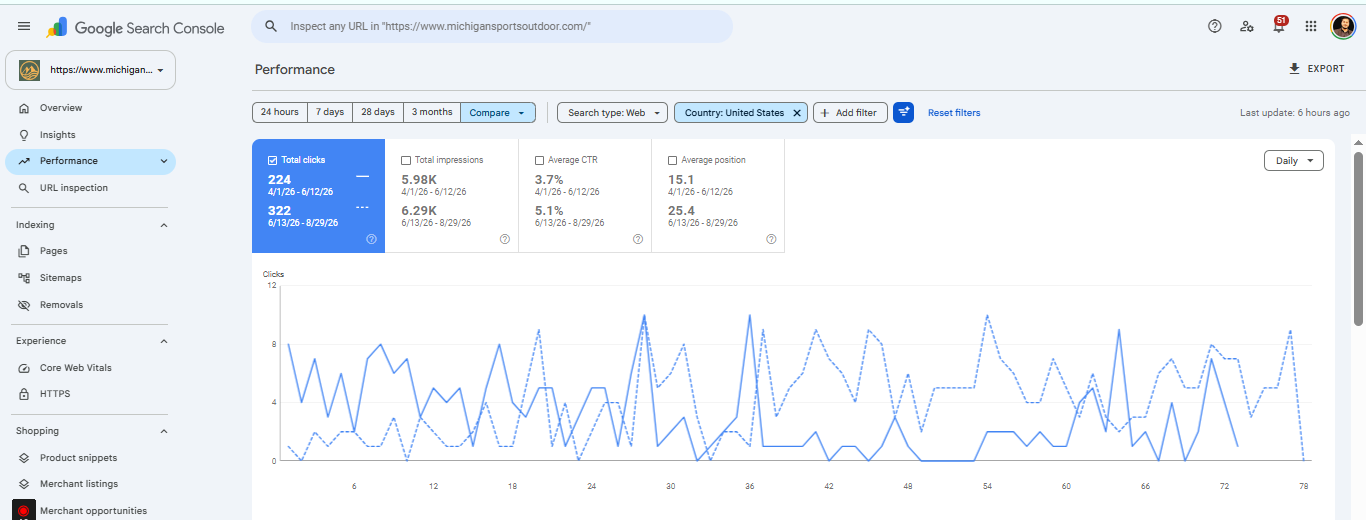
The case study separately compares two U.S. Search Console windows: 224 clicks from April 1–June 12 and 322 clicks from June 13–August 29; reported CTR moved from 3.7% to 5.1%. The date windows are not equal in length and multiple changes were made, so I treat this as directional context, not a controlled test or causal revenue claim.
One number I do not claim here is a 500% revenue increase for this store. The project evidence available for this case does not substantiate that figure. Revenue needs its own store analytics, attribution window, and comparison before it belongs in a case-study claim.
See the Michigan Sports & Outdoor case study for the full project context and supporting proof. Its indexing and click data should be kept distinct from the WooCommerce revenue screenshots and from results achieved on other stores.
How I investigated mass product-page non-indexing
First, I separate pages by their role and by the exact issue Google reports. “Discovered” and “Crawled” currently not indexed do not mean the same thing: the first points toward discovery/crawl prioritization to investigate; the second means Google fetched the page but did not include it. Neither label alone proves the root cause. Use the matching guides for Discovered – currently not indexed and Crawled – currently not indexed.
- Build a URL inventory. Export affected URLs and group by product, category, brand, pagination, filter/query parameters, and status reason. Include stock state and product importance if available. Sample pages from each group instead of assuming every URL shares one fault.
- Check crawl and index directives. For a sample, confirm the response is successful, the page is not accidentally blocked or noindexed, the canonical points to the intended product URL, and the page is not a duplicate route. Review server logs and Search Console crawl stats for repeated failures or unnecessary URL patterns.
- Inspect WooCommerce-specific output. Check product visibility/catalog settings, variant URLs, category pagination, faceted-filter parameters, internal search pages, canonicals and sitemap inclusion. Plugin/theme settings vary; validate the rendered HTML and response headers rather than following a generic toggle list.
- Prioritize page groups from the top down. Strengthen useful category and brand hubs first, then connect those hubs to in-stock, commercially relevant products. Use crawlable links that describe the destination and make sense to shoppers. Internal linking improves discovery paths; it does not guarantee indexing.
- Improve what a shopper gets from each page. Add accurate specifications, compatibility or fit notes, availability, original product details and helpful comparisons where they distinguish the page. Avoid generating thousands of near-identical descriptions just to fill an indexation gap.
- Keep sitemaps clean and re-measure in batches. Include canonical, indexable URLs that return successfully. A sitemap is a discovery hint, not an indexing command. Apply a verified template fix to a bounded group, then compare the same statuses after Google has had time to recrawl.
For a broader platform guide, continue with our Shopify and WooCommerce indexing blueprint, the ecommerce product-page SEO guide, and the WooCommerce SEO checklist. If the pattern spans multiple templates, see our indexing recovery service and ecommerce SEO service.
A practical WooCommerce recovery sequence
- Protect the strongest paths. Make important products reachable from relevant categories, brands and navigation—not only from XML sitemaps or internal search.
- Choose a small pilot. Pick representative URLs from one diagnosed issue group. Record baseline indexing status, clicks/impressions and the technical/content change before applying it widely.
- Fix the template or source cause. Correct only what the evidence points to: a wrong canonical, accidental noindex, non-200 response, disconnected product, parameter crawl trap, thin/duplicated content, or another verified issue.
- Update discovery signals. Link the affected pages from relevant hubs and keep the sitemap limited to canonical URLs you want considered for indexing. Do not flood URL Inspection with the entire catalog.
- Compare like with like. Re-check the same URL group and Search Console reason after recrawl. Track organic impressions/clicks and actual store outcomes separately; no change should be credited with revenue without comparable order data and attribution.
Do not disallow URLs in robots.txt before checking how that would affect Google’s ability to recrawl and see a noindex or canonical. A blunt block can hide the very signal needed to process an already known URL. Confirm the intended removal method for the specific status before making a site-wide change.
Make the findings useful to searchers and AI systems
Answer Engine Optimization (AEO), Generative Engine Optimization (GEO), and LLM discoverability start with a clear, crawlable page that solves a real user problem. For an ecommerce owner diagnosing indexation, state the short answer first, name the exact Search Console status, separate observations from hypotheses, show the dated case evidence, and link to the relevant next guide. Keep source citations and author identity visible.
- Use descriptive headings and concise answers. Explain one problem at a time; make a paragraph understandable without requiring a reader to infer missing context.
- Support claims with dated evidence. Show which store, country, date range and metric the screenshot represents. Explain limitations and avoid turning a correlation into a causal claim.
- Keep URLs and entities clear. Link related guides with meaningful anchor text; use canonical URLs and valid Article/Product structured data where appropriate. Schema can clarify information but does not guarantee indexing or AI citations.
- Write for owners and shoppers first. There is no special “LLM text” or magic word count that secures a citation. Google’s current guidance emphasizes unique, useful content and foundational SEO for its generative search features; it does not promise that a format or tactic will earn an AI Overview mention.
For technical steps, read Google’s guidance on ecommerce site structure, crawling errors, and generative AI search features.
FREE WOOCOMMERCE INDEXING TRIAGE
Find the page group behind your store’s indexing problem
Share your store URL and the Search Console status you’re seeing. Mubashar will review a representative sample of category, brand, and product URLs, then send practical first steps within 24 hours. No indexing guarantees.
Where NicheSEO PRO fit into the workflow
I used NicheSEO PRO as a way to organize investigation and identify opportunities—not as a substitute for Google’s own reports or a guarantee of rankings, citations, or sales. Its site audit and health views can help surface technical items; domain overview and AI visibility can add context; keyword opportunities can help prioritize topics. A revenue estimate is a hypothesis to validate against the store’s actual analytics and order data.
For each proposed change, I still want to know: which URLs are affected, what Search Console says about them, whether the page is useful to a shopper, and what outcome we will review later. That keeps a long list of audit flags from becoming a checklist of changes without a business reason. See NicheSEO PRO for the tool details.
A free indexing triage for your store
If your U.S. WooCommerce store has a large batch of excluded product URLs, request a free initial review. Share your store URL and the Search Console status or sample URLs you are concerned about. Mubashar will return a practical first-step diagnosis within 24 hours. The review identifies what to investigate next; it does not guarantee Google will crawl, index, rank or cite any page.
What I would measure next time
- Index coverage by meaningful page type, alongside the number of submitted canonical URLs.
- Search Console impressions, clicks, CTR, and query mix for matched date windows and the same country/device filters.
- Server response and crawl patterns for priority templates, not just total crawl volume.
- Organic landing-page sessions, qualified product views, add-to-cart events, orders, and net revenue from the store platform—using a stated attribution model.
Core Web Vitals and response reliability matter to the user experience and technical quality, but I do not present them as a direct indexing switch. Nor do I rely on bulk “Web 2.0” backlinks. If outreach makes sense, I focus on relevant editorial or industry sources and measure the referral and search impact honestly.
Frequently asked questions
Why are many WooCommerce product pages not indexed?
There is no single cause. Check the exact Search Console exclusion reason, then sample URLs for crawl access, response codes, canonicals, internal links, product availability, and distinctive shopper value. Fix the pattern before requesting indexing for individual URLs.
Should I request indexing for every product URL in Google Search Console?
No. URL Inspection is not a bulk indexing mechanism. Improve the root cause for the affected page group, link important pages through useful category and brand navigation, and keep XML sitemaps focused on canonical, indexable URLs.
Does this 90-day Michigan Sports & Outdoor result guarantee the same result for my store?
No. It is a documented before-and-after case observation, not a controlled experiment or forecast. Store platform, catalog quality, technical state, competition, and Google's indexing decisions vary.
Does structured data or AI-ready copy make Google index a product page?
No. Structured data can help search engines interpret eligible content, and clear writing can help readers, but neither guarantees crawling, indexing, AI citations, or rankings.
Does a sitemap submission guarantee that Google indexes ecommerce pages?
No. Google says sitemaps are a hint. The URL still needs to be accessible and indexable, and Google decides whether it belongs in the index.
Did this case produce a verified 500% revenue increase?
No such figure is supported by the evidence cited in this article. We would need comparable store revenue records and a clear attribution method before making that claim.
Sources

Mubashar Sharif
Founder & SEO Analyst at SearchPrex
Mubashar leads SearchPrex’s founder-led SEO work for law firms, local businesses and ecommerce brands. He combines technical audits, Search Console data and local market research to build practical search strategies, with more than five years of hands-on experience across 20+ clients.
“I treat index recovery as a discovery and page-value problem, not a submission-volume contest. Fix the cause, prioritize the URLs that matter, then measure what changes in Search Console.”
— Mubashar Sharif, SearchPrex
Join the Discussion or Request Our Next Topic
Share your perspective in the public thread below, or tell us what SEO teardown, case study, or update regarding How I Rebuilt Ecommerce Indexing: A 90-Day Guide for WooCommerce Stores you want us to cover next.
Community Perspectives (0)
Loading discussion...

