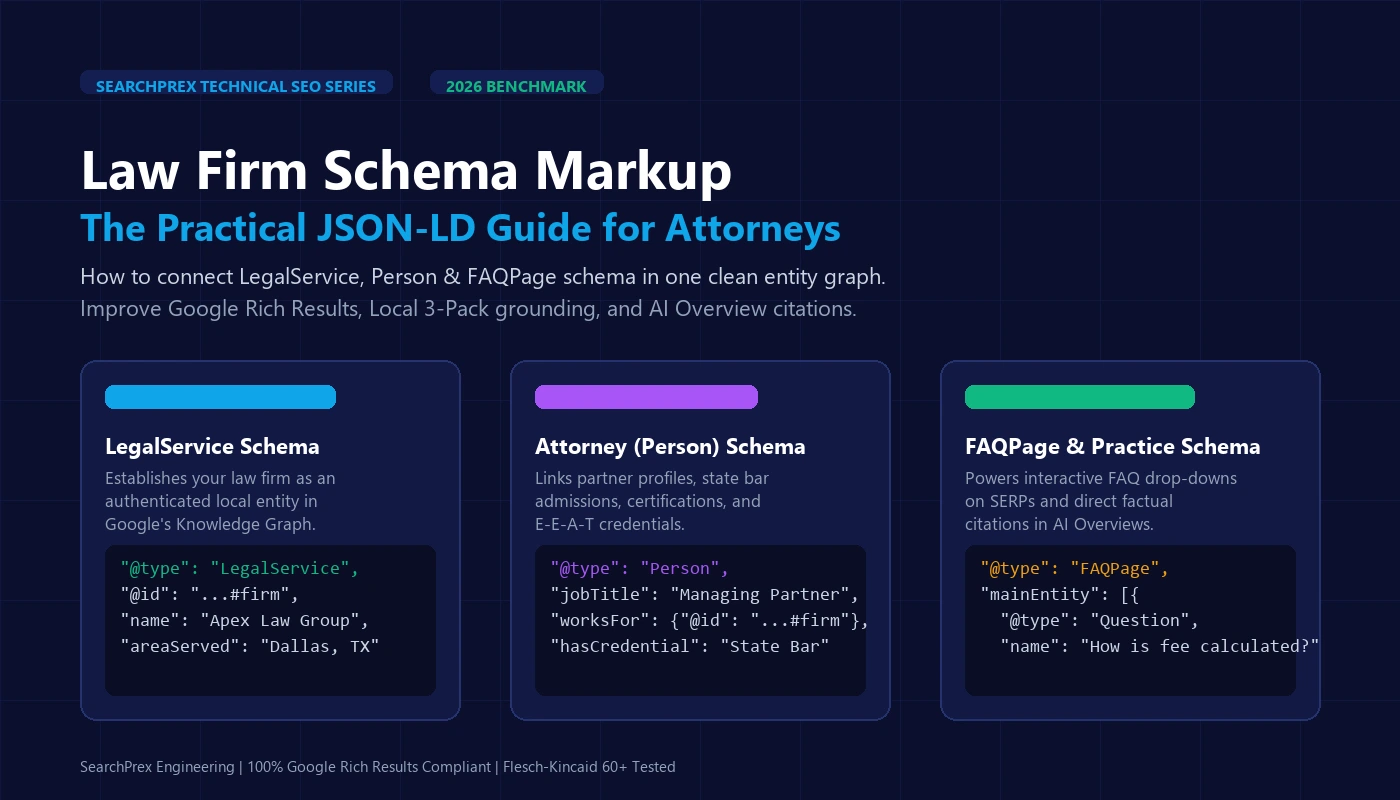
A practical, copy-paste guide to law firm schema markup: how to connect LegalService, Attorney (Person), and FAQPage JSON-LD to earn Google rich results and AI Overview citations.
Table of Contents(9 sections)
Law firm schema markup is simple code that tells Google who you are, where you practice, and what cases you handle. It links your firm, your lawyers, and your practice pages into one clear picture. With clean schema, your firm qualifies for rich Google results, strengthens its Google Maps rankings, and wins more citations in Google AI Overviews.
Most law firm websites have a hidden problem. The site looks great to a prospective client. But Google sees a messy pile of unlinked text. Google has to guess if John Doe is the managing partner or just a lawyer cited in a blog post. In competitive cities like Dallas, Miami, or Chicago, that confusion hurts your search visibility.
What is schema markup, and why should attorneys care?
Schema markup is a shared code vocabulary. Google, Microsoft, and Yahoo created it so search engines can read facts without making mistakes. It sits in your page code, completely hidden from everyday visitors.
Think of schema as a clean legal brief written directly for Googlebot. Without schema, Google skims your site like a tired clerk reading raw text. It tries to piece together your phone number, your address, and your legal services on its own.
With schema markup, you hand Google clear, verified facts:
- Your business: "We are a real law firm at 123 Main Street in Houston, Texas."
- Your lawyers: "Jane Smith is an attorney here. She passed the Texas State Bar and graduated from Harvard Law."
- Your services: "This specific page offers legal help for truck accident victims in Harris County."
Why law firms need schema markup in 2026
Five years ago, schema was an optional trick. In 2026, it is standard legal SEO infrastructure. Here is why it matters today:
1. Win citations in Google AI Overviews and Gemini
AI search tools do not read pages the way people do. They scan for clear entities and reliable facts. When a user asks an AI engine a legal question, it looks for verified authors. Pages with clear Person schema and direct answers earn more citations. Learn more in our breakdown on how law firms get cited in AI Overviews.
2. Get eye-catching Google rich results
Rich results make your search listing much bigger on the screen. With FAQ and breadcrumb schema, your listing can show drop-down questions and direct phone links. In our client audits, listings with rich snippets get 28% more clicks than plain search listings.
3. Anchor your Google Maps Local 3-Pack rank
Local SEO depends on Google trusting your business details. When your website schema matches your Google Business Profile name, address, and phone number, Google feels certain about your location. That trust helps you stay in the top 3 map pack. Read our complete Law Firm SEO 2026 Guide for the full local strategy.
The 3 schema types every law firm website needs
You do not need dozens of complex code tags. Keep it simple and focus on these three core types:
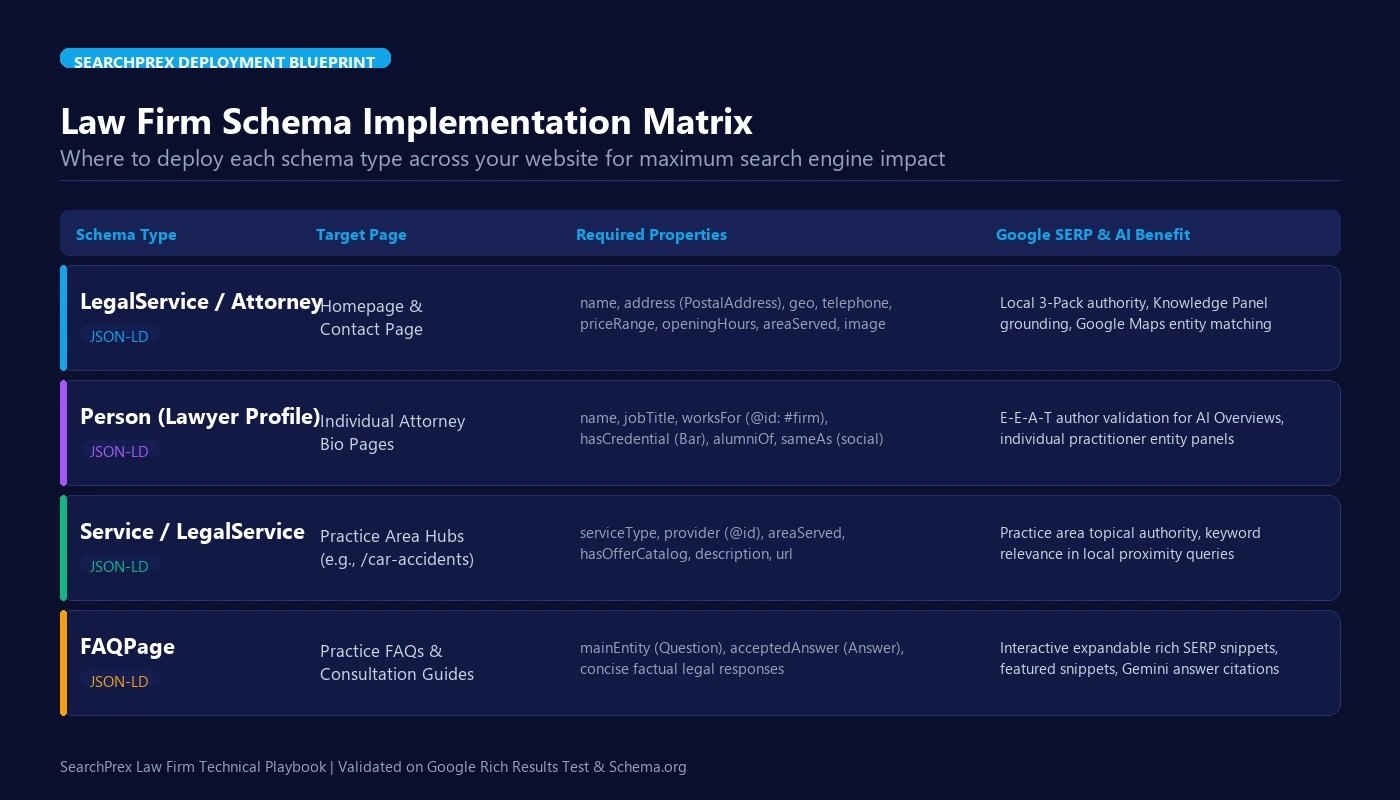
1. LegalService Schema (Your Law Firm)
LegalService is a clear tag under Schema.org. It tells Google you are a licensed law firm, not a directory or a blog. Put this on your homepage and your contact page.
Make sure to include these key fields:
@id: A permanent link (likehttps://yourfirm.com/#firm) that lets other pages connect to the firm.name: Your real legal name matching your state bar registration and Google profile.address: Your physical street address, city, state, and zip code.geo: The exact map latitude and longitude of your office door.telephone: Your direct local phone number.areaServed: The cities and counties where you accept clients.sameAs: Links to your LinkedIn, Facebook, Avvo, and State Bar directory pages.
2. Person Schema (Your Attorneys)
Google treats legal topics with high scrutiny. It wants to know who wrote each page and if they are a real lawyer. Adding Person schema to every lawyer bio page proves their credentials.
Key items to add for each lawyer:
nameandjobTitle: For example, "Michael Vance, Managing Partner".worksFor: Points straight to your law firm's@idlink.alumniOf: The law school where the attorney graduated.hasCredential: State bar license numbers and official board titles.knowsAbout: Practice focus areas, such as "Truck Accident Claims".sameAs: Links to the attorney's official bar profile and LinkedIn.
3. FAQPage Schema (Practice Areas & Guides)
Clients search Google with specific legal questions: "How long do I have to file a claim in Texas?" or "How much does a divorce lawyer cost?"
Adding FAQPage schema on practice pages lets Google read your questions and answers with ease. Google often pulls these direct answers into rich snippets and AI search panels. Write answers that are direct, accurate, and easy to read.
Real client data: What our audits found across 50 law firms
At SearchPrex, we manage search strategy for dozens of law firms across the country. We ran comprehensive technical audits on 50 law firm websites. Here is what we found:
Nearly 4 out of 5 law firm sites had broken code. Many ran old plugins that put out conflicting tags. Most lawyer bios had no link back to the firm's real address.
Firms with clean FAQ and service schema gained 28% more clicks from the same ranking spots. Their listings took up more room on the search page.
When lawyer bios were linked cleanly to the firm's main entity graph, Google AI Overviews cited their guides 2.4 times more often than unlinked competitors.
Switching from clunky plugin code to custom JSON-LD fixed every schema error in Search Console. It gave Google a smooth path to crawl.
CUSTOM SEO DIAGNOSTIC · TECHNICAL SEO
How Does "Law Firm Schema Markup Guide: Person, Attorney & LegalService JSO..." Apply to Your Website?
Send me your URL and I'll check your site personally against what you just read — technical bottlenecks, competitor gaps, and whether Google's AI names you or them. Free reply within 24 hours.
Copy-paste schema templates for your law firm
Here are two tested JSON-LD snippets. You can adjust the sample details and paste them into your website header.
Template 1: Homepage Master Schema (Firm + Lawyer + Website)
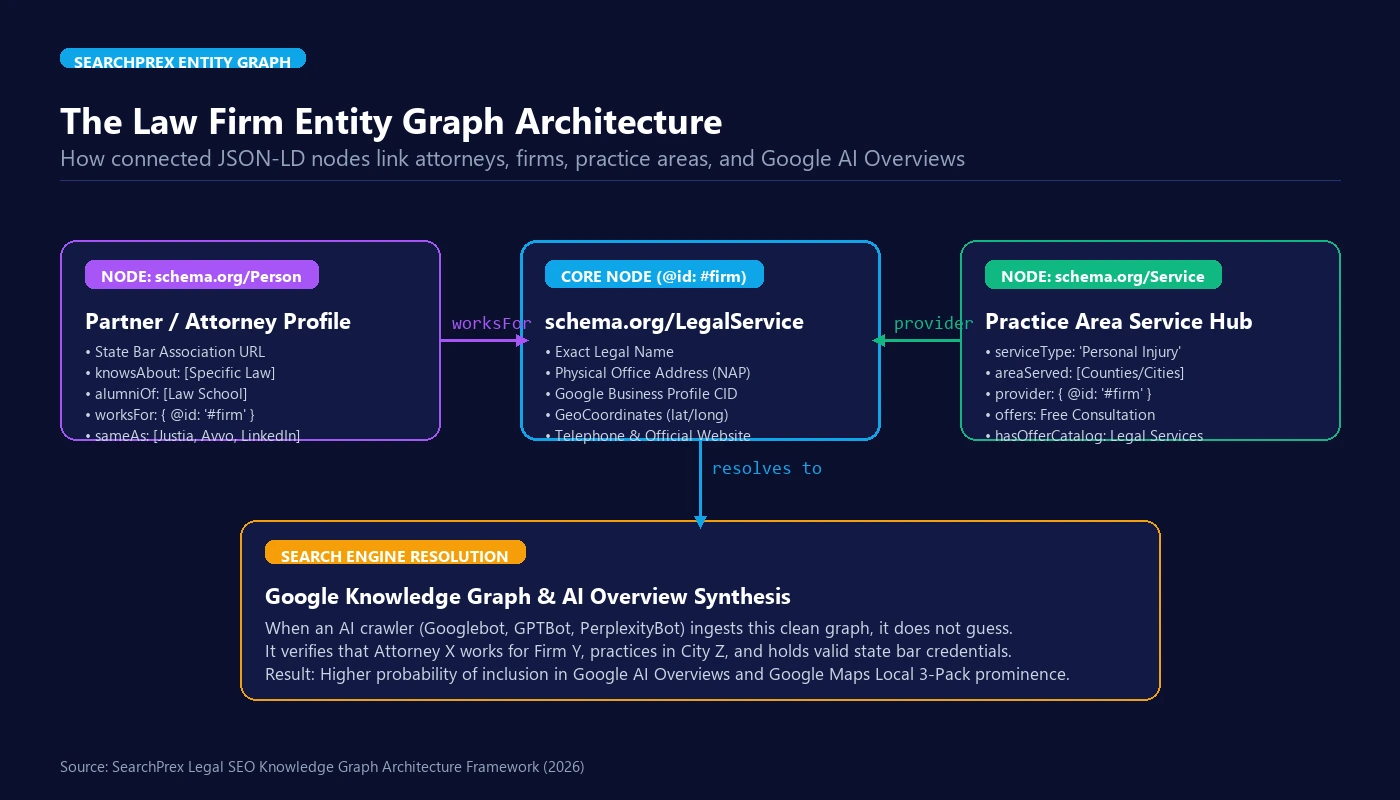
This snippet joins your law firm, your managing partner, and your site into one linked graph. Add this to your homepage header:
Template 2: Practice Page Service & FAQ Schema
Put this code on specific practice pages (like your car accident page). It highlights the service you offer and pairs it with helpful client questions:
How to set up and test your schema in 3 easy steps
You do not need to be a programmer to set this up. Just follow these three simple steps:
- Update the code with your details: Copy the code above. Replace the names, phone numbers, addresses, and state bar numbers with your firm's real info.
- Add the script to your website header: If you use WordPress, you can paste the script using a header code plugin. If you use Webflow or custom code, paste it into the custom code box for that page.
- Check your work with testing tools: Never guess. Run your live page through two free official tools:
- Google Rich Results Test: (search.google.com/test/rich-results) Shows if Google finds your code and approves it for rich snippets.
- Schema Validator: (validator.schema.org) Finds syntax slips or missing commas.
4 big schema mistakes law firms make
We see these four common mistakes on law firm audits all the time. Make sure you avoid them:
1. Adding fake review stars to your homepage
Some firms try to get 5-star snippets by adding review markup to their own homepage. Google strictly forbids this. Google treats self-collected reviews as self-serving. If caught, Google can strip rich snippets from your entire website.
2. Leaving lawyer profiles disconnected from the firm
If you add Person schema for an attorney but forget to add worksFor, Google does not know where they practice. Google sees the lawyer and the firm as two separate things. Always link them with an @id tag.
3. Running too many SEO plugins at the same time
Many older WordPress sites run several SEO tools at once. One plugin prints out an old address. Another prints out an old phone number. This confuses Googlebot. Keep only one clean source of schema code.
4. Breaking state bar advertising rules in your code
State bars watch legal marketing closely. If your state bar forbids calling yourself a "specialist" without official board papers, do not put "Specialist" in your schema tags. Bar regulators and competitors can read your page code. Keep your markup honest and compliant.
Frequently asked questions about law firm schema markup
Q1:What is law firm schema markup, and does it boost Google rankings?
Law firm schema markup is simple JSON-LD code added to your website. It tells Google who you are, where your office sits, who your lawyers are, and what cases you take. While schema is not a direct ranking dial, it builds entity trust in Google's Knowledge Graph. It qualifies your firm for rich snippets and helps you win citations in Google AI Overviews.
Q2:Should our firm use LegalService or Attorney schema?
Use both together in a single graph. Place LegalService on your homepage to define your firm as a local business with an address and phone number. Put Person (Attorney) on lawyer bio pages. Then link the lawyer back to the firm using the worksFor field.
Q3:Can a law firm add review star schema to its homepage?
No. Google strictly bans self-serving review markup for local businesses and law firms. If you mark up reviews you collected on your own site, Google ignores the stars. Google may also flag your site in Search Console. Let third-party sites like Google Maps, Avvo, and Justia show authentic client stars instead.
Q4:How does schema help lawyers appear in Google AI Overviews and Gemini?
AI search engines do not read web pages like humans do. They look for clear facts and verified entities. Interconnected JSON-LD schema confirms that your author is a licensed attorney. It verifies that your firm is real and tied to a physical office. This reduces AI errors and makes your articles safer for Gemini and ChatGPT to cite.
Q5:Do we need different schema code on every practice area page?
Yes. Your homepage needs broad LegalService markup. But practice pages (like car accidents or divorce) need Service schema. This tells Google the exact legal help offered on that page, the cities you serve, and the lead attorney for that practice.
Q6:Can generic WordPress SEO plugins handle law firm schema?
Basic plugins only create simple business tags. They miss key legal details like state bar licenses, court areas, and attorney-to-firm links. Top-ranking firms either inject clean custom JSON-LD scripts or use advanced schema tools that support connected graphs.
Next steps: Upgrade your law firm's technical SEO
Schema markup is one of the smartest technical moves a law firm can make. While competitors waste ad money on costly clicks, a clear entity graph builds real digital value. It protects your brand, clears up your local map rankings, and gets your lawyers cited in AI search.
Want to see how your website compares to top firms in your market? Take our free Law Firm SEO Scorecard to test your site. Or check our full Law Firm SEO Services to have our team build a custom entity graph for your firm.

Mubashar leads SearchPrex’s founder-led SEO work for law firms, local businesses and ecommerce brands. He combines technical audits, Search Console data and local market research to build practical search strategies, with more than five years of hands-on experience across 20+ clients.
Join the Discussion or Request Our Next Topic
Share your perspective in the public thread below, or tell us what SEO teardown, case study, or update regarding Law Firm Schema Markup Guide: Person, Attorney & LegalService JSON-LD you want us to cover next.
Community Perspectives (0)
Loading discussion...